






 Partners




 Download
 Buy
BuySQL Maestro for MySQL online help
| Prev | Return to chapter overview | Next |
Modifying new object definition

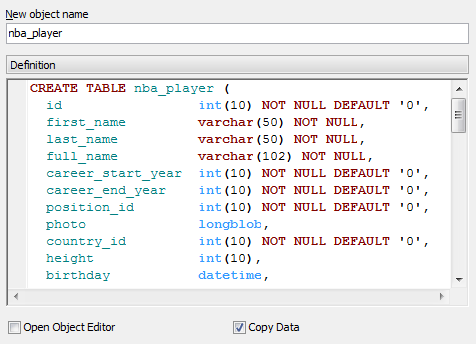
The last wizard step allows you to edit the new object definition directly.
Use this step to edit the name of object been creating (New Object Name). By default SQL Maestro for MySQL generates the new object definition with the same name if the duplicating is to the source database, or like "%SOURCE_OBJECT_NAME%01" otherwise.
Note: the name of the object must be unique among all the object names in its container. Moreover, all the objects that are source of data need unique names among themselves. You can use any identifier that is allowed by MySQL server.
You can edit the result SQL statement manually, add or remove fields, change field types, using the New object definition text area. Click the Ready button to complete the operation.
Check the according boxes to Copy Data (only for tables) and to Open Object Editor after the duplicating.
| Prev | Return to chapter overview | Next |